
TypeScript Vs. JavaScript: What's The Difference?

Zarnish Khan
Nov 16, 2023 · 5 min read

JavaScript has long been the go-to programming language for building dynamic and interactive web applications. However, in recent years, TypeScript has emerged as a strong contender, offering additional features and advantages.
In this comparison guide, we will explore the differences between TypeScript and JavaScript, helping you make an informed decision about which language best suits your project needs.
TypeScript
TypeScript is a popular open-source programming language developed by Microsoft. It is a superset of JavaScript, meaning it extends and adds additional features to the base language.
TypeScript introduces static typing, enabling developers to define data types for variables, leading to improved code reliability and early error detection. It also supports modern ECMAScript features and object-oriented programming concepts like classes, interfaces, and inheritance.
TypeScript's strong tooling support, including better IntelliSense and code navigation, makes it a preferred choice for building large-scale applications and complex projects. The transpilation process converts HTML Typescript code into standard JavaScript, making it compatible with all modern browsers.
When to use TypeScript
- Large-scale Projects: TypeScript shines in large and complex projects, as its static typing helps catch errors early, improving code maintainability and reducing bugs.
- Code Collaboration: TypeScript's type annotations and clear interfaces make it easier for teams to collaborate, understand each other's code, and maintain consistency across the project.
- Object-Oriented Programming: If your project requires robust object-oriented features like classes, interfaces, and inheritance, TypeScript's OOP support makes it a suitable choice.
What Are The Limitations?
While TypeScript offers numerous benefits, it also comes with some drawbacks to consider. One primary con is the added complexity introduced by static typing, which may require developers to spend more time defining types and handling type-related errors. This can lead to longer development cycles, especially for small projects.
TypeScript's learning curve can also be a challenge for developers new to the language. Additionally, the need for a compilation step adds a slight overhead to the development process. TypeScript's growing popularity has resulted in larger bundle sizes when compared to pure JavaScript, impacting the application's load time for end-users.
JavaScript
JavaScript is a versatile and widely-used programming language primarily employed for web development. It enables developers to add interactivity and dynamic features to websites, making them more engaging and responsive.
As a client-side scripting language, script type JavaScript runs directly in users' web browsers, allowing it to manipulate HTML content, handle user interactions, and communicate with web servers. With its extensive libraries and frameworks, JavaScript has become a cornerstone of modern web development, enabling developers to create interactive web applications, games, and responsive user interfaces.
When to Use JavaScript
- Simple Projects: For smaller and straightforward projects, JavaScript provides a lightweight and agile solution without the need for additional transpilation steps.
- Quick Prototyping: JavaScript's dynamic typing allows for rapid prototyping and experimentation, providing faster development cycles.
- Compatibility and Flexibility: When targeting a broad range of platforms and browsers, JavaScript's compatibility is preferred due to its native support in virtually all modern web browsers.
What Are The Limitations?
While JavaScript is a powerful and widely-used programming language, it has some drawbacks to consider. One major con is its dynamic typing, which can lead to runtime errors and make code harder to maintain in larger projects. JavaScript's lack of strictness can also result in unexpected behavior, leading to debugging challenges.
As a client-side language, JavaScript is susceptible to browser compatibility issues, requiring extra effort to ensure consistent functionality across different browsers. Additionally, JavaScript's global scope can lead to variable naming conflicts and potential security vulnerabilities if not handled carefully. Despite these cons, JavaScript remains a fundamental language for web development due to its versatility and extensive community support.
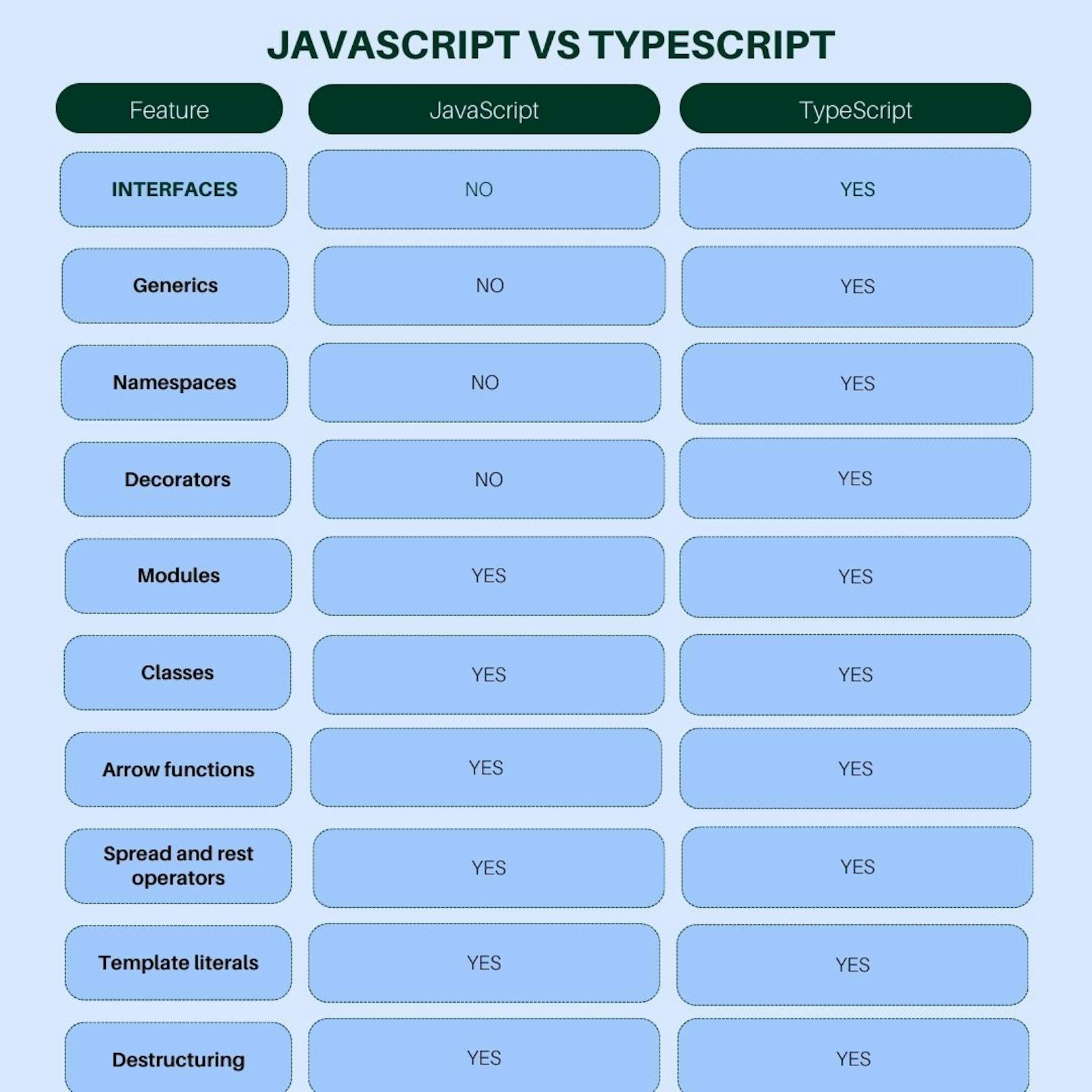
TypeScript Vs. JavaScript: A Detailed Comparison
Static Typing vs. Dynamic Typing
The most significant distinction between TypeScript and JavaScript lies in their typing systems. JavaScript is dynamically typed, allowing variables to change data types during runtime. TypeScript, on the other hand, is statically typed, requiring variable types to be defined at the time of declaration. This helps catch errors during development and enhances code reliability.
Enhanced Tooling and IntelliSense
TypeScript provides rich tooling support and superior IntelliSense (code autocompletion and suggestions) compared to JavaScript. This enables developers to write code more efficiently, catch potential errors early, and navigate through complex codebases effortlessly.
Optional Type Annotations
TypeScript offers optional type annotations, allowing developers to gradually introduce types into their existing JavaScript codebases. This means you can start using TypeScript features without rewriting your entire codebase from scratch.
Object-Oriented Programming (OOP) Features
TypeScript is an object-oriented superset of JavaScript, supporting features like classes, interfaces, inheritance, and access modifiers. This encourages developers to write more structured and maintainable code.
Compilation Step
TypeScript requires a compilation step to transpile its code into plain JavaScript, which is then executed in the browser. JavaScript, being a scripting language, doesn't require compilation.
Browser Support
Since TypeScript code needs to be transpiled to JavaScript, it might introduce slight overhead during runtime. While most modern browsers support JavaScript, TypeScript support might require additional configuration or use of build tools.
Community and Adoption
JavaScript has an extensive and well-established community, with a vast array of libraries and frameworks available. TypeScript, being relatively newer, is rapidly gaining popularity, and its adoption is growing steadily.
Final Word
In summary, the decision between TypeScript and JavaScript depends on your project's requirements, team expertise, and development goals. If you value static typing, enhanced tooling, and the advantages of OOP, TypeScript might be the better choice.
On the other hand, if you prioritize simplicity, easy integration, and have an existing JavaScript codebase, sticking with JavaScript HTML might be more practical. Ultimately, both languages have their strengths, and selecting the appropriate one can significantly impact the success and maintainability of your web development projects.